What’s the Difference Between an AI Skill and an AI Agent?
A practical, slightly technical breakdown, using a real fashion-tech build as the example.
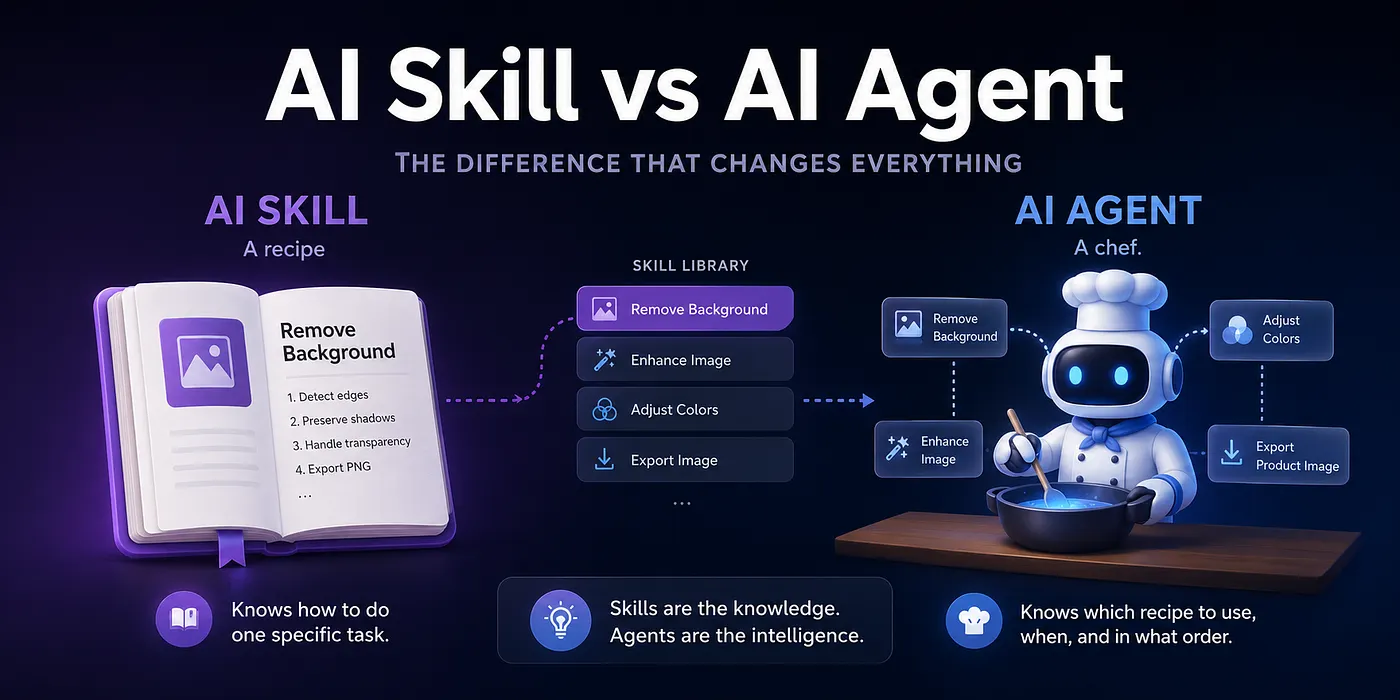
A practical, slightly technical breakdown — using a real fashion-tech build as the example.
If you’ve been following the AI space over the last few months, you’ve probably noticed two words being thrown around almost interchangeably: skills and agents.
People use them as if they mean the same thing. They don’t. And once you understand the architectural difference, a lot of the design choices behind modern AI products suddenly make sense.
I’ve spent the last year building both for my own indie projects and for a product I’m currently shipping called Showloom. So instead of writing yet another abstract explainer, I want to walk through how this actually works in practice. What each piece is. How they relate. And why the distinction is more than just terminology.
The Kitchen Analogy (Before We Get Technical)
Before the technical layer, here’s the mental model I keep coming back to:
- A skill is a recipe.
- An agent is the chef.
A chef without recipes is just someone with vibes in a kitchen.
A recipe without a chef is just paper.
You need both. And they are absolutely not the same thing.
The recipe knows how to make one specific dish. The chef knows when to grab which recipe, in what order, and how to combine the results into a complete meal.
That’s the relationship. Now let’s go a layer deeper.
What a Skill Actually Is
A skill is a structured, self-contained instruction set that teaches an AI model how to perform one specific task.
In most modern implementations, a skill has three parts:
- Metadata: a name and a short description
- Instructions: the actual procedure the model should follow
- Resources: optional supporting files, templates, references
The metadata is short. The instructions can be long often thousands of words explaining the exact steps, edge cases, formatting rules, and validation logic for that single task.
Here’s a simplified example of what the metadata for a skill might look like:
```
name: remove-background
description: Removes the background from a product image while preserving the product edges, shadows, and material translucency.
```
That’s the label on the cookbook spine. Tiny by design.
The full instructions inside the skill might run for hundreds of lines: how to detect complex edges, how to handle semi-transparent fabrics, how to preserve drop shadows, what file formats to output, when to retry, when to escalate.
But here is the critical detail that most non-technical explanations miss:
The full instructions are not loaded into the model until the skill is actually needed.
This single design decision is where most of the magic comes from.
The Context Window Problem (And Why Skills Solve It)
To understand why “load on demand” matters, you need one quick concept: the context window.
Every LLM has a finite amount of text it can hold in its working memory at once. This is measured in tokens roughly, fragments of words. Every system prompt, every user message, every uploaded file, every tool description, every previous turn of the conversation: all of it consumes tokens. And when the context fills up, the model gets slower, more expensive to run, and less accurate. It literally has less room to think.
Context is a scarce resource. You don’t waste it.
Now think about what happens without skills.
If you wanted your AI agent to be capable of, say, 50 different tasks, the naive approach is to dump all 50 procedures into the system prompt. The agent reads everything every time, even when 99% of it is irrelevant to the current request.
The numbers add up fast. A single full skill instruction set can easily be 1,000+ tokens. Multiply that by 50 and you’ve burned around 50,000 tokens before the user has said hello.
The skill architecture solves this with a simple trick:
The agent only ever sees the skill’s metadata, the name and description until it decides that a particular skill is relevant. Only then does it load the full instructions.
Roughly, this turns ~1,000 tokens per skill into ~50 tokens per skill at idle. A ~20x reduction in context cost, while still giving the agent access to the full library.
This is what people mean when they say skills are “on a need-to-know basis.” The agent doesn’t carry every recipe in its head all day. It carries the labels and grabs the right recipe in the right moment.
What an Agent Actually Is
An agent is the runtime that orchestrates everything.
If a skill is a procedure, an agent is the system that:
- Reads the user’s request
- Holds the always-on context (rules, workflows, standing instructions, anything that needs to be loaded every turn)
- Scans available skills by their metadata
- Decides which skill, or combination of skills, fits the request
- Loads the full instructions for the chosen skill
- Executes the procedure
- Chains multiple skills together when the task needs more than one
- Returns results to the user
There’s usually also a persistent configuration file often called `agents.md` or `CLAUDE.md` depending on the platform, that defines the always-loaded context. This is for things the agent should know every single time, regardless of which specific task is running:
- Coding conventions
- Branching and PR workflows
- Brand voice
- Permission rules
- Tool access
- Domain-specific terminology
This file gets injected on every turn. Which is exactly why you don’t put skill-level detail in it. Workflows that are situational belong in skills. Rules that are universal belong in the always-on layer.
The split looks like this:

Get this split wrong, and you either bloat your context (skills in the always-on file) or you forget important rules (universal logic buried in a skill the agent rarely invokes). Most early AI workflows fail because of one of these two mistakes.
A Real Example: How Skills + Agent Work Inside Showloom
I’m currently building Showloom a tool for fashion and apparel brands. The pitch is simple: instead of running a full photoshoot, a brand uploads a plain product image, picks a model (from a library or their own), and the system turns it into on-brand lifestyle images and videos.
The result of a photoshoot, without the photoshoot.
Under the hood, this is a textbook agent + skills setup.
The agent sits at the top. It receives a request like create five lifestyle images for this jacket on this model and figures out the full pipeline that needs to run.
The skills are the specialists. Each one knows exactly one part of the pipeline:
- A background removal skill that handles complex edges, shadows, and translucent fabrics
- A pattern analysis skill that captures textures, prints, and material properties of the product
- A product structure skill that understands cut, fit, and drape so the product behaves correctly when worn by a different body
- A model integration skill that places the product onto the chosen model while keeping proportions, lighting, and perspective consistent
- A composition skill that brings everything back together into one clean, on-brand image
- A post-processing skill for color grading, output formats, and aspect ratio variants
The agent decides which skills to call, in which order, and how to pass the output of one skill as input to the next. If a skill fails say the background removal can’t cleanly separate a sheer fabric the agent decides whether to retry with different parameters, escalate, or call a different skill entirely.
What’s nice about this design is that each skill is independently improvable. I can ship a better pattern-analysis skill without touching anything else. I can swap in a new model-integration technique if a better one comes along. The agent doesn’t change. The orchestration logic doesn’t change. Only the specialist gets upgraded.
That’s the real power of the architecture: modularity at the workflow level, not just the code level.
Why This Architecture Matters
Beyond the token math, there are a few practical reasons this design is becoming the default.
Maintainability. Skills are small, single-purpose files. They’re easier to write, test, debug, and version than monolithic prompts. When something breaks, you know exactly which skill to look at.
Composability. New behaviors emerge from combining existing skills rather than writing new ones from scratch. Want to add a “remove background → analyse pattern → place on a new model” workflow? You don’t write new logic. You orchestrate existing skills.
Specialization without bloat. Because skills load only when needed, you can have hundreds of them without paying a context cost for the ones you’re not using. The agent’s working memory stays clean and focused.
Reasoning quality. Less irrelevant context means better attention. The model can focus on the actual task in front of it instead of filtering noise from 49 unrelated procedures.
Cost. Tokens cost real money at scale. A 20x reduction in idle context shows up as a real line on the invoice.
The Mental Model, Restated
Here’s the cleanest way to hold all of this in your head:
- Agents are orchestrators with always-on context. They decide what to do.
- Skills are specialists with on-demand context. They handle how to do specific things.
- The split between them is fundamentally a context-window optimization you load what’s universal, you defer what’s situational.
A few years ago, building something like Showloom would have required a full team, a long roadmap, and a real photo studio. Today, with the right agent + skills setup, a small team can ship it from a laptop in a matter of weeks.
The space between “idea” and “working tool” keeps getting thinner. And honestly, the more I work with this architecture, the more I’m convinced this isn’t just a workflow trick. It’s the actual blueprint for how AI products are going to be built from here on.